Scaling your Facebook Ads can feel like chasing a moving target—but there’s a secret weapon savvy advertisers use to hit their mark with precision: Facebook Lookalike Audiences. These powerful tools allow you to find people similar to your existing customers and deliver your ads directly to them. If you’re ready to expand your reach while maintaining high performance, you’re in the right place.
In this guide, we’ll walk you through everything you need to know to leverage lookalike audiences to skyrocket your campaign performance, all while answering your most pressing questions.
Understanding Facebook Lookalike Audiences
What Are Lookalike Audiences?
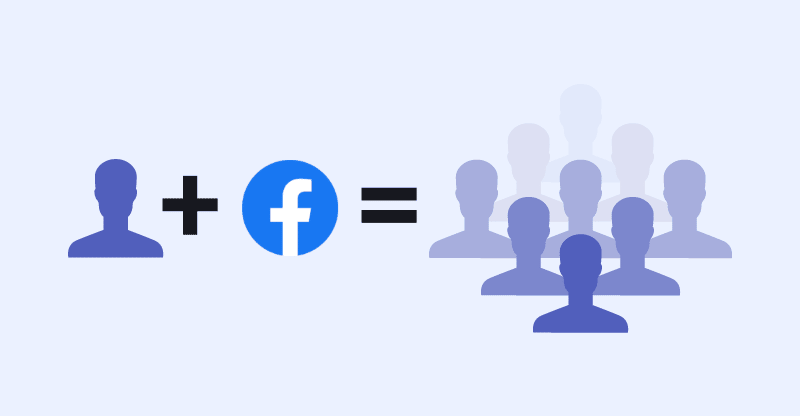
Lookalike Audiences are custom groups of people on Facebook who resemble your existing audience in behavior, interests, and demographics. Facebook’s algorithm takes a “source audience” and finds users who “look like” those individuals based on thousands of data points.
Why Use Lookalike Audiences in Facebook Ads?
They’re efficient, high-converting, and scalable. Instead of guessing who your ideal customer might be, Facebook’s system does the heavy lifting—finding users most likely to take the desired action (click, sign-up, purchase) based on real data.
How Facebook Generates Lookalike Audiences
The Role of Source Audiences
Your lookalike audience is only as strong as your source. A high-quality, engaged source—like recent buyers or loyal email subscribers—will result in a higher-performing lookalike segment.
Matching Behaviors & Demographics
Facebook’s machine learning evaluates behaviors such as purchase activity, time spent on site, device usage, and engagement to match new users to your source. The more data Facebook has, the better the match.
Prerequisites for Creating Lookalike Audiences
Types of Custom Audiences You Can Use
You can build a source audience from:
- Website visitors (via Facebook Pixel)
- Customer email lists
- App activity
- Facebook Page engagement
- Video views
- Purchase events
Minimum Data Requirements
Facebook recommends a source audience of at least 100 people from a single country. But the sweet spot? 1,000 to 5,000 high-quality users for optimal match quality.
Step-by-Step Guide to Creating a Lookalike Audience
Navigating to Audience Settings in Meta Business Suite
- Open Meta Business Suite.
- Go to Audiences under the Ads Manager.
Selecting the Right Source Audience
Choose a custom audience that has shown strong conversion behavior. Recent purchasers, frequent site visitors, or newsletter subscribers often yield excellent lookalikes.
Choosing the Audience Location and Size
- Location: Select countries or regions where you want your lookalikes to be located.
- Size: Ranges from 1% to 10%. A 1% audience is the most similar to your source; as you increase size, reach increases but similarity decreases.
Saving and Naming Your Lookalike Audience
Give your audience a descriptive name like “US – 1% Lookalike – Past Purchasers” for easy identification in campaigns.
Best Practices to Scale Ads with Lookalike Audiences
Start with 1% Similarity for High Match Quality
These audiences offer the most precision. Begin here to gather data before expanding.
Expand Gradually to 2%-10% for Wider Reach
As your campaigns succeed, test higher percentages. Use broader ranges (5%-10%) for awareness or traffic goals.
Test Multiple Lookalike Sources
Not all sources perform equally. Try creating lookalikes from different behaviors: purchasers, video viewers, top spenders.
Use Lookalikes in Conversion Campaigns
Lookalikes perform best when paired with strong call-to-action ads and conversion objectives.
Creative and Ad Copy Tips for Lookalike Audience Campaigns
Matching Ad Creative to Audience Intent
Craft your message to align with user stage. For cold lookalike audiences, focus on benefits, brand story, and trust signals.
A/B Testing Visuals and Messages
Test different images, headlines, and CTAs. Even subtle changes in tone or design can significantly impact conversion rates.
Budgeting and Scaling Strategies
How to Allocate Budget for Lookalike Campaigns
Start with a moderate budget (20-30% of total) and scale up based on performance.
Using CBO (Campaign Budget Optimization)
Let Facebook allocate your budget across multiple lookalike ad sets. This ensures the best-performing audiences get the most spend.
Tracking and Measuring Campaign Performance
Key Metrics to Monitor (ROAS, CTR, CPA)
Track your Return on Ad Spend (ROAS), Click-Through Rate (CTR), and Cost Per Acquisition (CPA). These indicators help you gauge efficiency and reach.
Optimizing Based on Audience Performance
Pause underperforming lookalike segments and double down on those yielding strong returns.
When Lookalike Audiences Don’t Work
Common Mistakes to Avoid
- Using a low-quality source audience
- Choosing too small a lookalike size too early
- Failing to test creatives and placements
Alternatives to Lookalikes
- Interest-based targeting
- Broad targeting with dynamic creative
- Retargeting warm audiences
Advanced Strategies with Lookalike Audiences
Layering Lookalikes with Interests and Behaviors
Combine lookalikes with detailed interest targeting for deeper segmentation.
Creating Lookalikes from High-Value Customers
Upload a list of top spenders or repeat buyers to create high-intent lookalikes.
Industry-Specific Tips for Lookalike Targeting
E-commerce vs. B2B vs. Local Services
- E-commerce: Focus on cart abandoners and past purchasers.
- B2B: Use lead forms and page engagement.
- Local Services: Build from local page engagement and form submissions.
Using Lookalike Audiences for Retargeting Funnels
Cold vs. Warm Traffic Segments
Use lookalikes to bring in cold traffic, then retarget those who engaged with dynamic ads and testimonials.
Geographic Targeting and International Scaling
Multi-Country Lookalikes
Expand beyond your home market by creating lookalikes in new countries using the same high-performing source.
Regional Budget Strategies
Test small budgets per region before ramping up. What works in one country may not work in another.
Comparing Lookalike Audiences with Interest-Based Targeting
Pros and Cons of Each Method
| Feature | Lookalike Audiences | Interest-Based Targeting |
|---|---|---|
| Accuracy | High | Moderate |
| Reach | Scalable | Broad |
| Cost Efficiency | Often Better | Varies |
| Best For | Scaling | Testing |
Tools and Resources to Enhance Lookalike Targeting
Facebook Analytics, Pixel, and Third-Party Tools
Use tools like:
- Facebook Pixel for accurate tracking
- Google Analytics to validate traffic behavior
- AdEspresso for ad testing
Conclusion: Unlocking the Power of Lookalikes to Scale with Confidence
Facebook Lookalike Audiences aren’t just a feature—they’re a strategic asset for any advertiser aiming to scale. Whether you’re just starting or managing multi-country campaigns, leveraging these audiences allows you to reach more of the right people, faster and more efficiently.
FAQs
1. What is the ideal size for a source audience?
A list of 1,000 to 5,000 engaged users is ideal for generating high-quality lookalike audiences.
2. Can I use website traffic as a source?
Yes! As long as you have Facebook Pixel installed, you can use visitors, page views, and actions like “Add to Cart” as a base.
3. What if my audience is too small?
Combine multiple segments or use broader actions (like page visits) until you hit the 100-user minimum.
4. How often should I refresh lookalike audiences?
Every 30-60 days, especially if you’re using dynamic sources like purchase activity or lead signups.
5. Do lookalike audiences replace interest targeting?
Not entirely. They work well together—lookalikes for scale, interest targeting for intent.