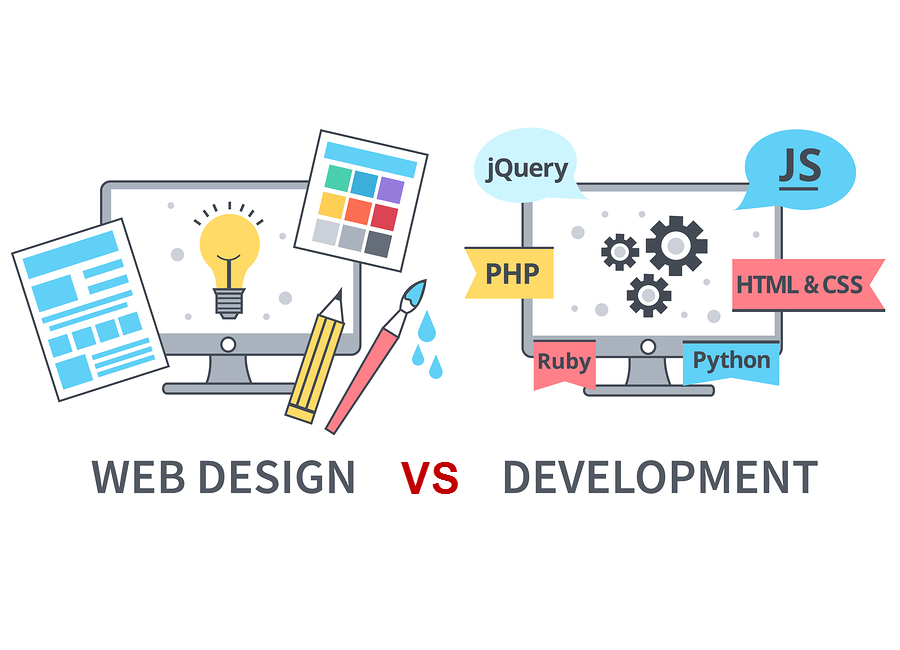
In the digital age, building a strong online presence is crucial for businesses, organizations, and individuals alike. This has led to a significant demand for professionals who specialize in creating and maintaining websites. However, when it comes to the world of websites, two major terms often arise—Web Design and Web Development. While both roles are essential for creating a successful website, they involve different skills, tasks, and tools. Understanding the distinction between web design and web development is key for anyone looking to create or revamp a website.
In this article, we will break down the core differences between web design and web development, exploring their unique roles, responsibilities, and how they work together to bring a website to life.
1. Understanding Web Design
Web design refers to the process of creating the visual layout and aesthetic elements of a website. A web designer focuses on the user experience (UX) and user interface (UI), ensuring that the website looks appealing, is easy to navigate, and provides an optimal experience for visitors. Web design involves the use of various tools, design principles, and software to create layouts, color schemes, fonts, and overall visual structure.
Key Responsibilities of a Web Designer:
- Visual Design: Crafting the overall look and feel of the website, including the layout, color scheme, typography, and imagery.
- User Experience (UX): Ensuring that the website is intuitive and provides a seamless experience for users.
- User Interface (UI): Designing interactive elements like buttons, forms, and navigation menus.
- Prototyping: Creating wireframes, mockups, and prototypes to visualize the site before it’s developed.
- Responsive Design: Making sure the website is optimized for different devices, such as smartphones, tablets, and desktops.
Tools Commonly Used by Web Designers:
- Adobe XD, Sketch, Figma: For creating wireframes, prototypes, and UI designs.
- Photoshop, Illustrator: For designing and editing graphics and visual elements.
- InVision, Axure: For building interactive prototypes and gathering feedback.
- Canva: For simple design tasks like creating banners or social media graphics.
Types of Web Design:
- UI/UX Design: Focuses on improving the interface and experience of a website.
- Graphic Design: Involves creating the visual elements that make the website aesthetically pleasing.
- Interaction Design: Concentrates on designing interactive features and animations that engage the user.
2. Understanding Web Development
Web development, on the other hand, involves the coding and programming that brings a website to life. Developers take the designs created by web designers and turn them into fully functional websites by writing code. Web development is divided into two main areas: front-end and back-end development.
Key Responsibilities of a Web Developer:
- Front-End Development: Implementing the design of the website using languages like HTML, CSS, and JavaScript. Front-end developers ensure that the website is responsive and looks exactly as designed on all devices.
- Back-End Development: Handling the server-side of the website, including databases, server management, and application logic. Back-end developers build the functionality behind features like user authentication, data management, and payment processing.
- Full-Stack Development: Some developers work on both the front-end and back-end, taking on the responsibilities of a full-stack developer.
- Debugging: Testing the website for errors and ensuring that it performs well across different browsers and devices.
Tools Commonly Used by Web Developers:
- HTML/CSS: For structuring and styling web pages.
- JavaScript: For creating dynamic, interactive elements on websites.
- Frameworks/Libraries: Like React, Angular, or Vue.js for front-end development, and Node.js, Laravel, or Django for back-end development.
- Databases: Like MySQL, MongoDB, or PostgreSQL for storing and managing data.
- Version Control Systems: Such as Git and GitHub to track changes in code and collaborate with other developers.
- IDEs: Integrated Development Environments like Visual Studio Code or Sublime Text for writing and debugging code.
Types of Web Development:
- Front-End Development: Deals with the visual components and client-side of the website.
- Back-End Development: Focuses on the server-side and database management.
- Full-Stack Development: Combines both front-end and back-end development into a single role.
3. The Key Differences Between Web Design and Web Development
Though web design and web development both play essential roles in creating a website, they are distinctly different in their focus, skillsets, and tools used.
Main Focus:
- Web Design: Concentrates on the visual and aesthetic aspects of a website. The goal is to create a site that is attractive, user-friendly, and engaging.
- Web Development: Focuses on the technical aspects of building a functional website. Developers ensure that the design works seamlessly on the web and that the site operates efficiently.
Skill Sets:
- Web Designers: Need to have a strong understanding of color theory, typography, layout design, and user experience principles.
- Web Developers: Require knowledge of coding languages, databases, and frameworks. They must also understand server management and web hosting.
Tools:
- Web Designers: Use tools like Photoshop, Adobe XD, Figma, and Sketch to design the visual elements of a website.
- Web Developers: Use programming languages like HTML, CSS, JavaScript, Python, and databases like MySQL to build the website’s structure and functionality.
4. How Web Design and Web Development Work Together
While web design and web development are separate disciplines, they must work in harmony to create a successful website. Here’s how the collaboration typically works:
1. Concept and Design:
Web designers first create the blueprint of the website, including layout, colors, fonts, and user interactions. The design is usually presented as a wireframe or mockup, providing a visual representation of the final website.
2. Development Phase:
Once the design is finalized, web developers begin coding the front-end to reflect the design’s look and feel. Developers then work on the back-end to integrate databases, servers, and any required functionalities.
3. Testing and Deployment:
After the website is fully coded, both designers and developers collaborate to test the site across multiple browsers and devices to ensure that it performs well and looks good everywhere. Finally, the website is deployed and made available online.
4. Ongoing Maintenance:
Both designers and developers play ongoing roles in maintaining the website. Designers may tweak layouts and visuals based on user feedback, while developers ensure that the site remains functional and secure over time.
5. Should You Hire a Web Designer or Web Developer?
If you’re planning to build a website, knowing whether to hire a web designer or a web developer will depend on your project’s needs:
- Hire a Web Designer: If you need help creating the visual look of your website, improving the user experience, or redesigning the aesthetics, a web designer is the right choice. They’ll ensure your site is visually appealing and user-friendly.
- Hire a Web Developer: If your website requires complex functionality, dynamic content, or server-side processes, a web developer is necessary. Developers bring the designs to life by coding the website and making sure everything functions properly.
Conclusion
Web design and web development are two distinct but interconnected disciplines that play a crucial role in building websites. Web designers focus on aesthetics and user experience, while web developers bring those designs to life through code. Both are essential for creating a successful website that looks good, functions well, and provides a seamless experience for users.
Understanding the differences between web design and web development can help you make informed decisions about who to hire or which career path to pursue. By working together, designers and developers create websites that meet the needs of both businesses and their audiences.
FAQs
Q1: Can a web designer also be a web developer?
Yes, many professionals are skilled in both areas, often referred to as full-stack developers. They can handle both the design and coding of a website. However, many web designers and developers choose to specialize in one area.
Q2: What are the most important skills for web designers?
Key skills for web designers include proficiency in design software (like Adobe XD or Figma), an understanding of UX/UI principles, knowledge of responsive design, and the ability to create visually appealing layouts.
Q3: What coding languages should a web developer know?
A web developer should be proficient in HTML, CSS, JavaScript, and, depending on the type of development (front-end or back-end), additional languages like Python, PHP, Ruby, or Node.js. Knowledge of databases like MySQL or MongoDB is also essential for back-end developers.
Q4: What’s the role of a UX/UI designer compared to a web developer?
A UX/UI designer focuses on creating an enjoyable, easy-to-use experience for users through well-designed interfaces. In contrast, a web developer is responsible for turning that design into a functional, interactive website by writing the necessary code.
Q5: Which is better for my career: web design or web development?
Both careers are in high demand, but the choice depends on your strengths and interests. If you have a passion for aesthetics, creativity, and user experience, web design may suit you. If you enjoy coding, problem-solving, and building technical systems, web development could be the better fit.