Introduction
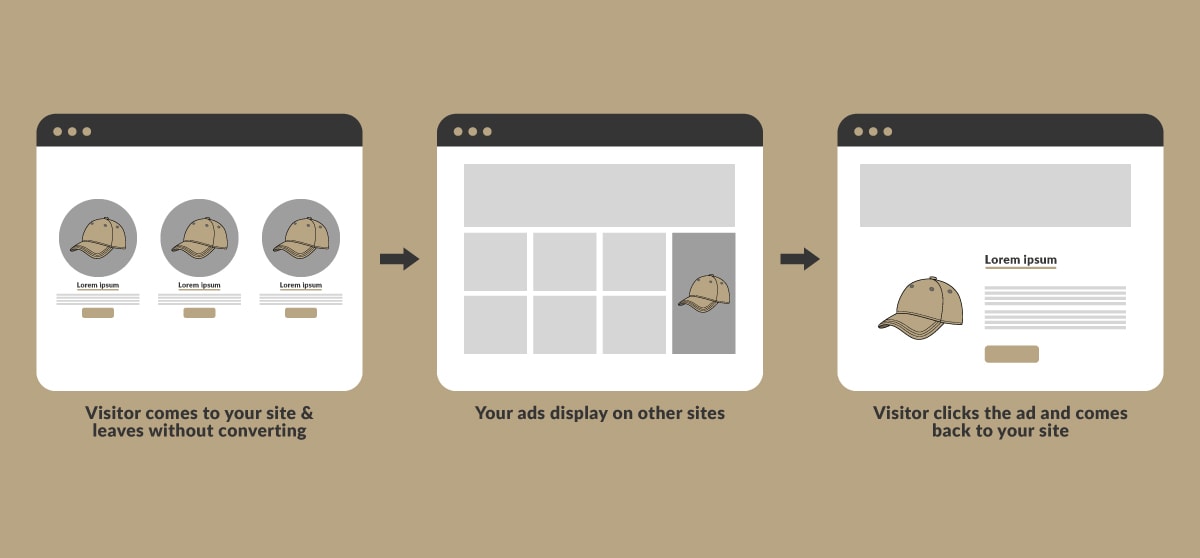
Facebook retargeting ads are a powerful digital marketing strategy designed to bring back lost customers and increase conversions. Many potential buyers visit your website or interact with your brand but leave without making a purchase. Retargeting ads help re-engage these users by reminding them of your products and services, leading to higher conversion rates and ROI.
What Are Facebook Retargeting Ads?
Facebook retargeting ads are a type of paid advertising that targets users who have previously interacted with your brand but didn’t complete a desired action, such as purchasing a product or signing up for a service. These ads are shown on Facebook, Instagram, and other platforms within the Meta ecosystem.
How Do Facebook Retargeting Ads Work?
- A Facebook Pixel is installed on your website to track visitor activity.
- The pixel collects data on users who viewed your pages, added products to their cart, or engaged with your social media.
- Facebook then categorizes these users into custom audiences.
- You create and launch retargeting ad campaigns to bring these users back to your website.
Benefits of Facebook Retargeting Ads
- Higher Conversion Rates – Retargeted users are already familiar with your brand, making them more likely to convert.
- Lower Ad Costs – Retargeting ads tend to have a lower cost-per-click (CPC) compared to regular acquisition ads.
- Increased Brand Recall – Keeps your brand top-of-mind for potential customers.
- Personalized Ad Experience – Allows for highly tailored messaging based on user behavior.
Types of Facebook Retargeting Audiences
Facebook provides various retargeting options based on user behavior:
1. Website Visitors
Target people who visited your website but didn’t complete a purchase or desired action.
2. Cart Abandoners
Show ads to users who added items to their cart but didn’t check out.
3. Social Media Engagers
Target users who have liked, commented, or shared your posts but haven’t converted.
4. Email Subscribers
Re-engage people who subscribed to your email list but haven’t taken further action.
5. Video Viewers
Target users who watched your video content but didn’t engage further.
Best Practices for Effective Facebook Retargeting Ads
1. Use Dynamic Ads
Dynamic ads automatically show users the exact products they viewed on your website, increasing relevance and conversion rates.
2. Segment Your Audience
Break down your audience based on behavior (cart abandoners, page visitors, etc.) to create personalized ad messages.
3. Optimize for Mobile Users
Ensure your ads are mobile-friendly, as most users access Facebook via smartphones.
4. Experiment with Different Ad Formats
Use carousel ads, video ads, and slideshow ads to see what works best for your audience.
5. Set Frequency Caps
Avoid bombarding users with too many ads, as it can lead to ad fatigue and reduced engagement.
Facebook Retargeting Ad Strategies to Win Back Lost Customers
1. Offer Exclusive Discounts
Providing a limited-time discount can encourage hesitant customers to make a purchase.
2. Use Urgency & Scarcity
Phrases like “Only a few left in stock” or “Limited-time offer” create urgency, prompting immediate action.
3. Showcase Customer Testimonials
Include reviews and testimonials to build trust and credibility with your audience.
4. Retarget Based on Purchase History
Upsell or cross-sell relevant products based on previous purchases.
5. Remind Users of Abandoned Carts
A well-crafted reminder ad with a special offer can persuade users to complete their purchase.
How to Set Up a Facebook Retargeting Ad Campaign
Step 1: Install the Facebook Pixel
- Go to Facebook Business Manager → Events Manager → Pixels.
- Copy and paste the Facebook Pixel code into your website’s header.
Step 2: Create a Custom Audience
- Navigate to Ads Manager → Audiences → Create Audience → Custom Audience.
- Choose a source (website visitors, cart abandoners, etc.).
- Define your audience duration (e.g., users who visited in the last 30 days).
Step 3: Design Your Ad
- Choose an engaging ad format (carousel, video, etc.).
- Add compelling copy, a strong CTA, and high-quality visuals.
Step 4: Set Up Budget & Schedule
- Choose daily or lifetime budget.
- Set start and end dates to control ad spending.
Step 5: Launch & Monitor
- Track performance metrics like CTR, conversion rate, and ROAS (Return on Ad Spend).
- Optimize based on data insights.
Conclusion
Facebook retargeting ads are one of the most effective strategies to bring back lost customers and increase conversions. By segmenting your audience, using dynamic ads, and optimizing your campaigns, you can maximize your ad performance and ROI.
FAQs
1. How long should I run a Facebook retargeting ad campaign?
It depends on your business goals, but typically, a campaign should run for 7–30 days to allow enough time for users to convert.
2. Do Facebook retargeting ads work for small businesses?
Yes! Facebook retargeting ads are cost-effective and allow small businesses to re-engage potential customers with a lower ad spend.
3. How much does it cost to run Facebook retargeting ads?
The cost varies based on audience size, ad quality, and competition. However, retargeting ads generally have a lower CPC than cold audience ads.
4. Can I retarget people who didn’t visit my website but engaged on Facebook?
Yes! You can retarget users who engaged with your Facebook page, watched your videos, or interacted with your posts.
5. What is a good ROAS for Facebook retargeting ads?
A good ROAS (Return on Ad Spend) is typically 3:1 or higher, meaning you make $3 for every $1 spent. However, this varies by industry.