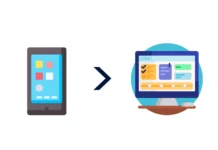
Web design is the process of creating visually appealing, user-friendly, and functional websites. It involves a combination of layout design, color schemes, typography, graphics, and interactive elements to ensure a seamless user experience.
Whether you’re a beginner looking to learn the basics or a business owner wanting to improve your website, this guide will cover everything you need to know about web design.
1. Understanding Web Design
Web design focuses on how a website looks and functions. A well-designed website not only attracts users but also enhances usability, branding, and engagement.
Key Elements of Web Design:
- Layout: The arrangement of content, images, and navigation.
- Color Scheme: A combination of colors that align with branding.
- Typography: The font styles, sizes, and readability.
- Navigation: Menus, buttons, and links for easy access.
- User Experience (UX): Ensuring a smooth and enjoyable browsing experience.
2. Web Design vs. Web Development
Many people confuse web design with web development. Here’s how they differ:
| Feature | Web Design | Web Development |
|---|---|---|
| Focus | Visual appearance and usability | Technical structure and functionality |
| Skills Needed | UI/UX design, color theory, typography | Coding (HTML, CSS, JavaScript, PHP) |
| Tools Used | Adobe XD, Figma, Sketch | VS Code, GitHub, CMS (WordPress) |
| Outcome | Aesthetic and user-friendly layouts | Functional and interactive websites |
3. Types of Web Design
There are different approaches to web design depending on the needs of a business or individual.
A. Responsive Web Design
- Adapts to different screen sizes (mobile, tablet, desktop).
- Ensures a seamless experience across devices.
B. Adaptive Web Design
- Uses different layouts for different devices.
- Not as flexible as responsive design.
C. Static vs. Dynamic Web Design
- Static websites: Simple HTML and CSS, no interactivity.
- Dynamic websites: Interactive features, databases, user logins.
4. Essential Web Design Principles
To create an effective website, designers follow these key principles:
1. Simplicity
A clean and minimalistic design enhances usability. Avoid cluttered layouts.
2. Consistency
Maintain uniformity in colors, fonts, and navigation for a professional look.
3. Mobile-Friendliness
With over 60% of web traffic coming from mobile devices, mobile-first design is crucial.
4. Fast Loading Speed
Optimized images and code improve website performance.
5. Accessibility
Websites should be usable by everyone, including people with disabilities.
5. Web Design Tools and Software
There are many tools available for designing websites.
| Tool | Purpose |
|---|---|
| Adobe XD | UI/UX design, wireframing |
| Figma | Collaborative web design tool |
| Sketch | Vector design and prototyping |
| Canva | Simple graphics creation |
| WordPress | CMS for building websites |
6. Coding in Web Design: Do You Need It?
While web designers don’t necessarily need to code, knowing basic HTML, CSS, and JavaScript can be beneficial.
Basic Web Design Code Example:
htmlCopyEdit<!DOCTYPE html>
<html lang="en">
<head>
    <title>Simple Web Page</title>
    <style>
        body { font-family: Arial, sans-serif; text-align: center; background-color: #f4f4f4; }
        h1 { color: blue; }
    </style>
</head>
<body>
    <h1>Welcome to My Website</h1>
    <p>This is a simple web page design.</p>
</body>
</html>
7. Web Design Trends in 2024
To stay competitive, web designers should keep up with the latest trends:
- Dark Mode UI: More websites are offering dark mode for better readability.
- Minimalist Design: Clean, clutter-free interfaces improve user experience.
- AI-Generated Designs: Tools like MidJourney and DALL·E help create unique visuals.
- Micro-Animations: Small animations enhance engagement.
- 3D and Immersive Experiences: Websites are becoming more interactive with 3D elements.
8. Web Design Careers and Salary
Web design is a lucrative career, with various job opportunities available.
| Job Role | Average Salary (USA) |
|---|---|
| Web Designer | $50,000 – $80,000 |
| UI/UX Designer | $70,000 – $120,000 |
| Front-End Developer | $75,000 – $110,000 |
| Freelance Web Designer | $30 – $100 per hour |
Conclusion
Web design is an exciting and creative field that plays a crucial role in building online experiences. Whether you’re a beginner or an aspiring designer, understanding the fundamentals will help you create engaging and visually appealing websites.
If you want to start your journey in web design, explore tools like Figma, Adobe XD, and WordPress and practice designing web pages.
Frequently Asked Questions (FAQs)
1. What is the difference between UI and UX in web design?
- UI (User Interface) focuses on the look and feel of a website.
- UX (User Experience) focuses on how users interact with the website.
2. Do I need to learn coding to become a web designer?
Not necessarily. Many tools like WordPress, Wix, and Figma allow designers to create websites without coding. However, learning HTML, CSS, and JavaScript can be beneficial.
3. How long does it take to learn web design?
It depends on your learning pace. With consistent practice, you can grasp the basics in 3-6 months.
4. What are the best platforms for creating websites?
- For beginners: Wix, Squarespace
- For professionals: WordPress, Webflow
- For eCommerce: Shopify, WooCommerce
5. How can I improve my web design skills?
- Take online courses (Udemy, Coursera).
- Practice designing in Figma or Adobe XD.
- Stay updated with the latest trends.
- Join web design communities.