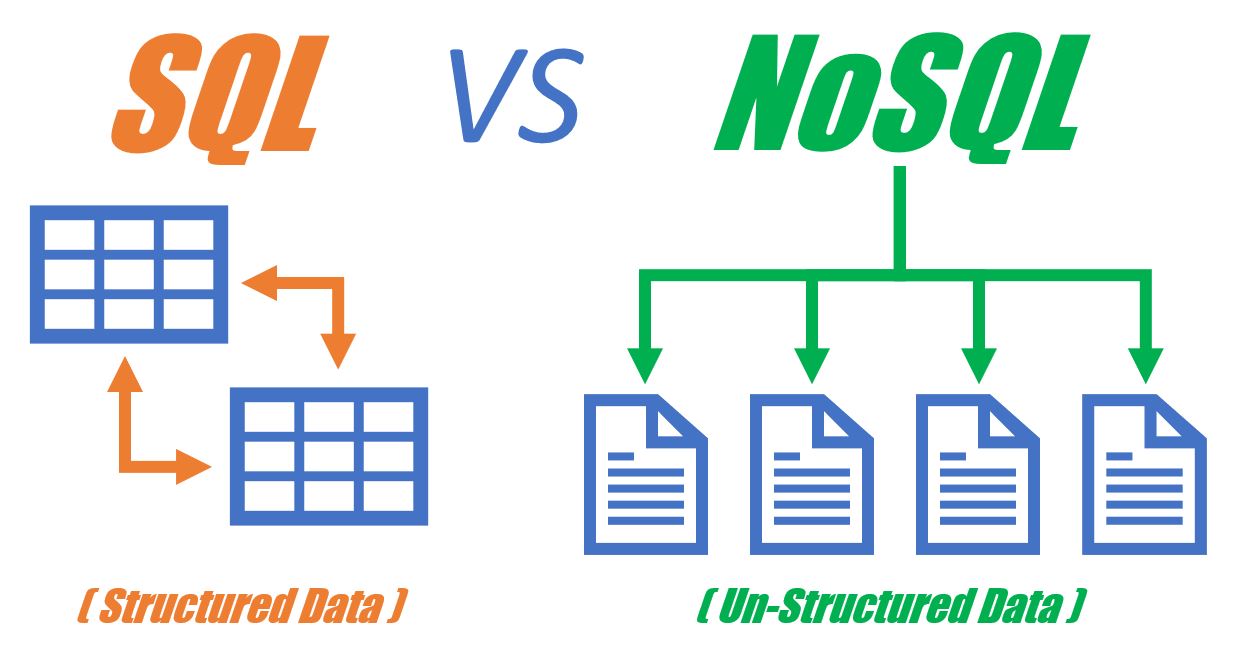
In today’s fast-paced digital world, choosing the best database for web development can make or break your application. Databases form the backbone of any dynamic website or web app, helping store, organize, and retrieve data efficiently. But with two major players—SQL and NoSQL—it’s crucial to understand which fits your project best.
Let’s explore the nitty-gritty of SQL vs. NoSQL, analyze top databases, and answer the most pressing questions developers ask in 2024.
Understanding the Role of Databases in Web Development
Web applications—from simple blogs to enterprise-level platforms—rely on databases to:
- Store and manage user information
- Handle real-time updates
- Support transactions
- Retrieve content dynamically
- Maintain logs, analytics, and session data
An efficient database ensures a smooth user experience, secure data handling, and fast performance.
What is SQL?
SQL (Structured Query Language) databases are relational, meaning they store data in rows and columns organized into tables. Each table has a fixed schema, and data types are strictly defined.
Popular SQL Databases
- MySQL – Widely used, open-source, and ideal for small to mid-sized projects.
- PostgreSQL – Advanced features and performance; perfect for complex applications.
- SQLite – Lightweight and serverless, great for local apps and testing.
- MariaDB – A MySQL fork with better performance and licensing.
Key Features of SQL Databases
- Structured data with predefined schemas
- Powerful joins and relational queries
- ACID compliance (Atomicity, Consistency, Isolation, Durability)
- Strong community support and mature tooling
What is NoSQL?
NoSQL databases are non-relational and provide a flexible structure for storing various data formats like documents, key-value pairs, or graphs.
Types of NoSQL Databases
- Document-Based (e.g., MongoDB): Stores JSON-like documents.
- Key-Value Stores (e.g., Redis): Ideal for caching and quick lookups.
- Column-Family Stores (e.g., Apache Cassandra): Excellent for handling large datasets.
- Graph Databases (e.g., Neo4j): Best for networked data (e.g., social networks).
Key Features of NoSQL Databases
- Schema-less or flexible schema
- High scalability and performance
- BASE consistency model (Basically Available, Soft state, Eventual consistency)
- Optimized for specific workloads like big data, IoT, or real-time feeds
SQL vs. NoSQL: Core Differences
| Feature | SQL | NoSQL |
|---|---|---|
| Structure | Relational (tables) | Non-relational (varied formats) |
| Schema | Fixed | Flexible or schema-less |
| Transactions | ACID-compliant | BASE model |
| Scalability | Vertical | Horizontal |
| Query Language | SQL | Varies (JSON, custom APIs) |
| Use Case | Complex queries, relationships | High-speed, unstructured data |
Performance Comparison
When it comes to speed, the winner depends on your use case.
- SQL excels in complex joins and structured queries.
- NoSQL often outperforms in high-speed data ingestion and unstructured data access, especially under heavy loads.
Caching and indexing strategies also significantly influence performance in both types.
Scalability: Vertical vs. Horizontal
- SQL databases typically scale vertically by increasing server resources.
- NoSQL databases scale horizontally across multiple servers, making them ideal for cloud-native applications.
If your user base is growing rapidly, horizontal scalability is a must.
Data Integrity and Transactions
- SQL supports multi-row transactions, making it essential for financial or inventory systems.
- NoSQL databases prioritize availability and partition tolerance, sometimes sacrificing immediate consistency.
Choose SQL when data accuracy is non-negotiable.
Use Case Scenarios: When to Choose SQL
SQL databases are ideal for:
- Banking systems
- Customer Relationship Management (CRM)
- E-commerce platforms
- Inventory and order tracking
These apps need structured, relational data and depend heavily on consistency.
Use Case Scenarios: When to Choose NoSQL
NoSQL databases shine in:
- Social media platforms
- Streaming services
- Real-time analytics
- IoT applications
- Gaming backends
These use cases demand high write speeds and flexible data models.
Combining SQL and NoSQL in Projects
Many modern architectures use a polyglot persistence approach—leveraging the strengths of both SQL and NoSQL.
For example:
- Use PostgreSQL for account and billing
- Use MongoDB for user-generated content and analytics
Security Considerations
- SQL is vulnerable to SQL injection attacks—input sanitization is crucial.
- NoSQL offers better native scalability but may need added layers for access control and encryption.
Both benefit from using SSL/TLS, robust authentication, and proper role management.
Cost and Hosting Options
- Cloud SQL services: Amazon RDS, Google Cloud SQL, Azure Database
- Cloud NoSQL services: Firebase, Amazon DynamoDB, Couchbase
- Open-source versions (like MySQL or MongoDB) can reduce costs for startups.
Developer Tools and Ecosystem
- SQL: phpMyAdmin, pgAdmin, MySQL Workbench
- NoSQL: MongoDB Compass, RedisInsight, Studio 3T
ORMs (like Sequelize or Mongoose) also bridge the gap between app code and databases.
Future Trends in Web Databases
- Serverless databases like PlanetScale or Firebase
- AI-assisted query optimizations
- Real-time and in-memory databases
- Multi-model databases that merge SQL and NoSQL traits
Conclusion
Choosing the best database for web development comes down to your project’s goals, scale, and data needs. SQL is best for consistency and structured relationships, while NoSQL offers speed, flexibility, and scale for modern apps. Often, the smartest move is using both—playing to each one’s strengths.
FAQs
Q1. Which database is best for a beginner web developer?
Start with MySQL or SQLite for SQL and MongoDB for NoSQL. They’re beginner-friendly and well-documented.
Q2. Can I switch from SQL to NoSQL later in my project?
Yes, but it can be complex. Use modular coding and data abstraction layers to simplify migration.
Q3. Is NoSQL better for real-time apps?
Absolutely. NoSQL databases like Redis and MongoDB excel in handling high-speed, real-time data.
Q4. Do I need both SQL and NoSQL for large applications?
Often, yes. Using both lets you tailor the database to each component’s needs.
Q5. Which database is most secure?
Security depends on configuration. SQL is mature with extensive security features, while NoSQL can be equally secure when properly set up.
Q6. Are cloud-hosted databases reliable?
Yes! Services like AWS RDS, Firebase, and Google Cloud offer highly reliable, scalable, and managed solutions.